If you’re running a security operation—whether it’s a small retail store with a handful of cameras, a mid-sized office complex, or a sprawling industrial site with hundreds of sensors and monitors—chances are you’ve faced a frustrating issue: a single video feed or alarm signal that needs to go to multiple devices, and it keeps dropping, distorting, or lagging. That’s where a signal distribution amplifier (SDA) comes in, and as a supplier who’s worked directly with installers, facility managers, and security techs for over a decade, I can tell you this: picking the right SDA isn’t just about grabbing the cheapest one off a catalog. It’s about matching your specific security system needs to the right features, and avoiding the mistakes that get people stuck with gear that doesn’t work when they need it most. Let’s break this down the way I do with every customer who walks through my door or calls in with a problem. Signal Distribution Amplifier
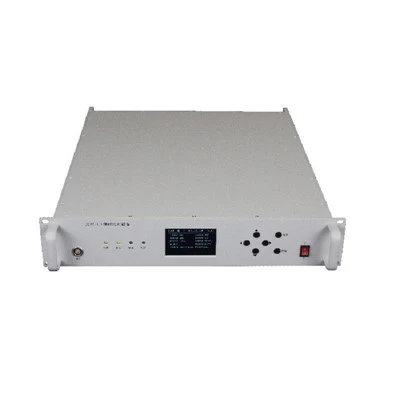
First, let’s get clear on what an SDA actually does for a security system, because I’ve seen too many people confuse them with splitters, and that’s where the first mistake happens. A basic coaxial splitter just divides a signal into copies, but it eats away at signal strength every time you split it—so if you run a 1080p camera feed through a 4-way splitter, by the time it reaches the fourth screen, you’re looking at grainy, laggy footage that’s useless for identifying a shoplifter or verifying an access breach. An SDA, on the other hand, amplifies and re-clones the original signal, so every output gets a copy that’s just as strong and clear as the source. For security, that’s non-negotiable: you can’t afford to have critical footage degraded because of a bad signal.
Now, the first thing to figure out when selecting an SDA is what type of signal your security system uses. This is the foundation, because if you buy an SDA for analog coaxial and your cameras are 4K IP, it’s not going to work—simple as that. Let’s walk through the two main signal types I work with most often, since that’s 90% of the security market right now. Analog (like HD-TVI, AHD, or traditional CVBS) uses coaxial cables and is still common in older systems or smaller setups. For these, you need an SDA rated for analog video, with the right connector type—usually BNC, since that’s standard for analog security gear. Then there’s IP (internet protocol) signal, which is what most new systems use: cameras send data over Ethernet, so you need an SDA that handles Ethernet signals, often called an Ethernet switch amplifier or IP video distribution amp. Wait, but not all Ethernet SDAs are the same—some are basic 10/100Mbps, which work for 1080p IP cameras, but if you have 4K or 8K cameras, you need a gigabit (1000Mbps) or even 10-gigabit SDA to avoid bandwidth issues. I had a customer last year who swapped out his old 4-way splitter for a basic Ethernet SDA for his 4K camera, only to find it couldn’t handle the bitrate, so the footage kept buffering. We had to swap it for a gigabit model that cost 20% more, but it saved him from having to re-run every Ethernet cable—something he would’ve done if he’d picked the wrong SDA first. That’s the kind of preventable mistake I want people to avoid.
Next, consider how many outputs you need. This seems like a no-brainer, but again, I see customers either buy too few and have to add more later (which often means compatibility issues) or too many and pay for ports they’ll never use. Let’s think about typical security use cases: a small coffee shop might have 4 cameras that need to feed 2 monitors at the front counter, 1 at the back office, and the NVR (network video recorder)—so that’s 4 outputs for 1 source. A mid-sized office might have 16 cameras feeding a 16-port NVR, plus 3 security guard stations and a lobby display—so 19 outputs. An industrial site might have dozens of cameras feeding a central command center, plus remote monitoring stations across the plant. The key here is to also leave a little headroom for future growth. I always recommend adding at least one extra output, or even two, if you think you might expand your cameras or add a remote monitor in the next year. For example, if your current system needs 5 outputs, buy a 7-port SDA instead of a 5-port. It’s a small upfront cost that saves you from having to buy a new SDA in 12 months when you add a new camera. Also, pay attention to whether the SDA has dedicated outputs or if it’s a shared port—some cheap models split a single bandwidth across all outputs, so if you have 4 outputs on a 10Mbps SDA, each only gets 2.5Mbps, which is too slow for HD video. Look for SDAs that offer dedicated bandwidth per output, which is standard quality for security systems.
Then there’s signal distance and cable type. How far are you running the signal from the camera to the devices that need it? For analog coaxial systems, the maximum distance for a good signal is around 500 feet with standard RG59 cable, but an SDA can extend that by boosting the signal—some models are rated for up to 1,500 feet with RG6 cable, which is thicker and better for long runs. For IP systems, Ethernet usually tops out at 328 feet with standard Cat5e cable, but gigabit SDAs with PoE (power over Ethernet) can extend that distance or even work with fiber optic connections if you’re running signals over 1,000 feet. PoE is another big one for security: many IP cameras need power via Ethernet, so if you get an SDA with integrated PoE, you don’t have to run separate power cables to the cameras, which cuts installation time and cost. I often tell customers to prioritize PoE capability if they’re wiring a new system, because it’s a huge time-saver. But make sure the SDA’s PoE budget matches your cameras’ power needs. A 15W PoE port works for most 1080p cameras, but 4K cameras might need 30W or more. If you overload the PoE budget, the SDA will shut down ports to avoid damaging devices—something that’ll make your system go out at 2 a.m. when you need it most.
Now, let’s talk about environment and durability, because security systems aren’t all installed in nice, temperature-controlled server rooms. I’ve worked with customers who bought cheap consumer-grade SDAs for outdoor camera setups, only to have them fry in extreme heat or rain. If your SDA is going to be installed in a hard-to-reach place—like a basement utility closet, an outdoor equipment enclosure, or a warehouse where temperatures can swing wildly—you need a ruggedized SDA, rated for wide temperature ranges (usually -40°F to 140°F), dust resistance, and moisture protection. Consumer-grade SDAs are fine for office server rooms or retail back offices that are climate-controlled, but for any exposed or harsh environment, get an industrial-grade SDA. I also recommend checking for surge protection, especially if you’re installing near outdoor cameras where lightning is a risk. A surge-protected SDA will save you from having to replace your entire camera system during a storm—something I’ve seen way too many customers skip, only to regret it later.
Another factor that’s often overlooked is compatibility with your existing gear. This isn’t just about signal type—it’s about firmware, NVR brand, and even monitor resolution. For example, some SDAs are designed to work with specific NVR brands, and if you mix a generic SDA with a Lorex NVR, you might get signal conflicts or no video at all. I always ask customers to bring their NVR model number, camera brands, and monitor types when they’re picking an SDA, or at least note that information down. I keep a compatibility chart for every SDA I sell, and 9 out of 10 times, I can tell someone which model works with their setup just by the details of their existing gear. Also, consider resolution: if you have 8K cameras, make sure the SDA is rated for 8K UHD, not just 4K. A lot of cheap SDAs claim to handle HD, but they top out at 1080p, so they can’t process higher resolution footage without distortion.
Wait, let’s circle back to a common misconception: more ports aren’t always better. A customer came to me last month bragging about buying an 8-port SDA for his 4-camera system, and when I looked at it, it was a basic model that only supported 1080p. He had 4 cameras that shoot 4K, so the SDA could only handle half the resolution, and he was frustrated that his footage looked worse. He paid $50 less for that 8-port model, but he lost $2,000 worth of 4K camera resolution. That’s the kind of trade-off that doesn’t make sense for security, where resolution is everything for identifying people and incidents. I always prioritize bandwidth and resolution support over port count when matching a customer’s needs.
Now, once you’ve narrowed down your options, there are a couple of final checks to do. First, check for ease of installation and maintenance. Some SDAs are plug-and-play, which is perfect for small setups where you don’t have a tech on staff. Others require mounting in a rack or hardwired, which is better for larger industrial systems. Also, look for SDAs that have status LEDs—little lights that show if each port is working, if there’s a signal error, or if power is on. That makes troubleshooting way easier if something goes wrong at 3 a.m. instead of having to pull out a multimeter. Second, think about warranty. A good SDA should come with at least a 2-year warranty, and some industrial models come with 5-year or even lifetime warranties. The cheap models sold on big marketplaces often have 30-day warranties, and if they break after 2 months, you’re out the cost and have to deal with downtime. As a supplier, I stand behind every SDA I sell, and I offer extended warranties for customers with larger systems, because I know how critical security uptime is.
Let me summarize this with a real example from a customer of mine who had a big win after picking the right SDA. Last year, a manufacturing plant contacted me because their existing splitter setup was causing 40% of their camera feeds to drop out during shifts, and they’d had 2 incidents where they couldn’t identify a safety hazard because the footage was grainy. We walked through their needs: 24 4K IP cameras, 6 outputs for security guards, central command, a remote monitoring office, and 2 extra ports for future expansion. They had runs of 800 feet between the main camera bank and the command center, so they needed a gigabit PoE SDA with fiber compatibility. We picked a ruggedized 26-port gigabit SDA with surge protection, dedicated bandwidth per port, and a 5-year warranty. Installation took 2 hours, and in the year since, they’ve had zero signal issues. When they added 4 more cameras last month, they just used the two extra ports we built in, no new SDA needed, and the footage is crystal clear. That’s the kind of result I want every customer to get.
If you’re still unsure about which SDA is right for your security system, don’t make the mistake of guessing based on price or port count. The right SDA is an investment in your security system’s reliability, and it’s worth taking the time to get it right. Whether you’re a small business owner setting up your first camera system or a facilities manager upgrading a large industrial site, I’m here to walk you through every step, answer your questions, and help you pick the gear that works for your specific needs. There’s no one-size-fits-all SDA for security, but with the right guidance, you can avoid the common mistakes that lead to bad signal and downtime.
If you’d like to discuss your specific security system needs, compare models, or get a customized quote, feel free to reach out to me to start a purchasing conversation. I’ve worked with hundreds of security professionals, and I’m happy to help you find the right signal distribution amplifier that keeps your system running when you need it most.
Time Sever References
- "Security Camera Signal Distribution: Avoiding Common Signal Loss Issues," Security Technology Executive, 2022.
- "PoE Power Budget and Compatibility Guidelines," IEEE 802.3af/at Standard for Power over Ethernet, 2021.
- "Ruggedized Electronics for Industrial and Outdoor Security Applications," National Electrical Manufacturers Association (NEMA) Standards for Enclosures, 2020.
- "Resolution and Bandwidth Requirements for Modern Security Video Systems," Video Technology Standards Association (VTSA), 2023.
China Go-Sat Microwave Co., Ltd.
China Go-Sat Microwave Co., Ltd. is one of the most professional signal distribution amplifier manufacturers and suppliers in China. With abundant experience, we warmly welcome you to buy advanced signal distribution amplifier made in China here and get quotation from our factory. All customized products are with high quality and competitive price.
Address: No.3908 ShiBo Avenue, Baqiao District, Xi’an, China
E-mail: sales@go-satcom.com
WebSite: https://www.go-satcom.com/
